
Debug console
You evaluated an entity and got the wrong variant, or no variant at all. The eval API tells you what happened. It does not tell you why.
The Debug Console on each flag page fills that gap. It sends evaluation with enableDebug: true and surfaces evalDebugLog.segmentDebugLogs, so you can replay an entity's context and walk segment by segment until evaluation stops.
The console uses POST /evaluation and POST /evaluation/batch only (not GET). For browser GET eval, see Use cases: GET evaluation.
Requirements:
- Server:
FLAGR_EVAL_DEBUG_ENABLED=true(default inpkg/config/env.go) - Request:
enableDebug: true
Turn the env off in production if you do not want segment logs on eval traffic. Impressions after render: Exposure logging. Concepts: Overview. Cache lag: Behavioral contracts.
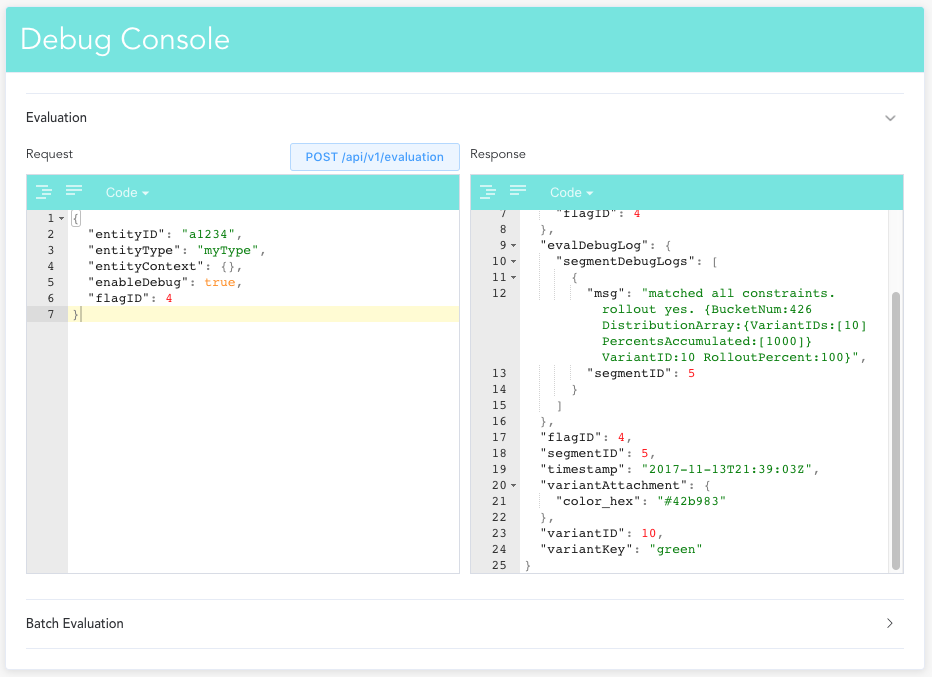
What you get
Each segmentDebugLogs entry has a segmentID and a free-text msg: which constraints matched, which did not, and (on a match) bucket and distribution reasoning.
Read the list in segment rank order. Evaluation stops at the first segment whose constraints match (even if rollout leaves variantKey empty); later segments never ran. Rules: behavioral contracts: segment evaluation.
Single evaluation
Use one entity when you are chasing one wrong assignment. The Evaluation panel sends POST /api/v1/evaluation with an editable body. Paste what your app actually sends:
{
  "entityID": "a1234",
  "entityType": "report",
  "entityContext": { "state": "CA" },
  "enableDebug": true,
  "flagID": 1
}
What to look at:
variantID/variantKey- assigned variant, or empty if nothing matched.evalDebugLog.segmentDebugLogs- per-segment trace (bucket number, distribution array, rollout percent when a segment matches).evalContext- what the server evaluated, including any injected keys.
Note:
segmentDebugLogsis a flat list of{ segmentID, msg }, not a structured per-constraint tree. On mismatch the compiled expression is dumped as one boolean expression.
That dump is the fastest path to the usual bugs: property name typo, missing field, or JSON type mismatch ("30" vs 30). Compare the expression to the map you sent.
The console shows a summary (matched variant + segment walk) next to the raw JSON.
Batch evaluation
When the question is "do my segments route the way I think across several entities?", use Batch Evaluation (POST /api/v1/evaluation/batch):
{
  "entities": [
    { "entityID": "a1234", "entityType": "report", "entityContext": { "state": "CA" } },
    { "entityID": "a5678", "entityType": "report", "entityContext": { "state": "NY" } }
  ],
  "enableDebug": true,
  "flagIDs": [1]
}
Good for regression-checking a constraint change: line up the contexts that should land in each variant, run them together, then open segmentDebugLogs on any miss.
Tips
- Always set
enableDebug: true. Without it, logs are omitted. The server gateFLAGR_EVAL_DEBUG_ENABLEDmust also be on (default true). - Use realistic
entityContext. Same fields as production (state,age,tier, injected headers if you rely on them). - Flag key or flag ID. Either works; the console pre-fills both from the current flag page.
- Blank after a config change. Wait for EvalCache reload (default 3s) before assuming a bug (behavioral contracts).